All Blogs
How Workday Reads Your Resume - Tested Across 4 Resume Layouts
We uploaded one resume to Workday four times. Columns parsed fine — projects, phone numbers and degrees didn't. Here's what broke and how to fix it.

You applied for a job, but never heard back. No email, no rejection, nothing. After the 10th time, you’ll wonder if anyone even read it.
Here's one reason. If you've applied anywhere in the last year, odds are your resume went into Workday – more than 11,500 companies use it, including most of the Fortune 500.
Workday doesn’t send your resume to the recruiter. It copies your resume into a form, and the recruiter reads the form. If your layout confuses it, the copy comes out wrong. A job goes missing. Dates get mixed up. A degree you never earned turns up on your application. Nothing breaks, no one tells you, and the recruiter reads the short version.
So we tested it. We took one resume, made four versions of it, and uploaded each one to a real Workday job page.
TL;DR
Workday doesn't send your resume to the recruiter. It copies your resume into a form, and the recruiter reads the form.
Anything the parser can't find stays blank, and recruiters search those fields – if your job title never landed in the title field, you don't come up in their results.
Columns aren't the problem. Projects listed alongside jobs, a +1 in front of your phone number, and a degree written loosely are – Workday reads a "Bachelor's in Computer Science" as a Bachelor of Arts.
Fix: plain section headings, phone without the country code, exact tool names from the posting, and check every field on the autofill screen before you submit.
What is Workday ATS?
Workday is HR software. Companies use it to run payroll, benefits, and hiring, and the hiring part includes the job page you apply through.
When you upload a resume there, Workday runs it through a parser. The parser turns your file into plain text, hunts for things it recognizes – employers, job titles, dates, degrees, skills – and drops each one into a field on the application form.
That form is your application. The recruiter opens it and reads the fields. Your PDF is attached, but it sits behind the form, and on a busy req most recruiters never open it.
So the question isn't whether your resume is good. It's whether the parser copied it correctly.
Who Uses Workday?
Workday is built for big companies. Over 11,500 organizations use it, so you'll hit it again and again at large employers and almost never at a startup.
You'll likely apply through Workday at:
Big US companies – most of the Fortune 500
Banks and finance – most major US and European banks
Consulting firms – the Big Four and other large global firms
Hospitals, universities, and government offices
Large Middle East employers – oil and gas, airlines, and government-owned companies
Retail chains and airlines – anywhere hiring hundreds of people at once
Note: if the company has thousands of employees, it's probably Workday. Smaller companies usually use Greenhouse, Lever, or Ashby, which read resumes differently.
How Does Workday Read Your Resume?
Your resume doesn’t reach the recruiter the way you wrote it. Here’s what happens between your upload and their screen.
Resume Turns into Plain Text
The layout goes first – columns, tables, headers, spacing. Workday then looks through what’s left for things it knows: employers, job titles, start and end dates, degrees, skills. Each one it finds goes into a field. Anything it misses stays blank.
Form is Application, Not Your Resume
The recruiter reads the fields, not your file. And when they need a Product Manager, they search Workday for “Product Manager” and get everyone whose job title field says that. If your title never made it into the field, you’re not in the results.
Skills Get Renamed
Workday doesn’t save what you typed. It matches your skills against its own list of more than 73,000 standardized skill names and saves its version, not yours. So write the plain name of the tool. “Python” gets matched. “Skilled in modern scripting languages” doesn’t.
Employers Add AI Ranking on Top
Workday sells an add-on called HiredScore that grades candidates when recruiters see the highest-scoring ones first. The grade is calculated from the fields, not from your file.
So a blank or wrong field doesn't just lose you a search result. It lowers your score.We Uploaded Four Resumes to Workday, Here's What Happened
We took one resume — a New York AI data scientist with two jobs, two projects, and 24 skills — and uploaded it to a live Workday job page four times. Same content every time. Only the formatting changed. Then we checked every field Workday filled in against what the resume actually said.
Most of it comes through. Job titles, employers, dates, and skills parsed correctly in the clean runs, and a two-column layout parsed fine too. Here’s what broke.
Your Projects Become Jobs You Can’t Fill In
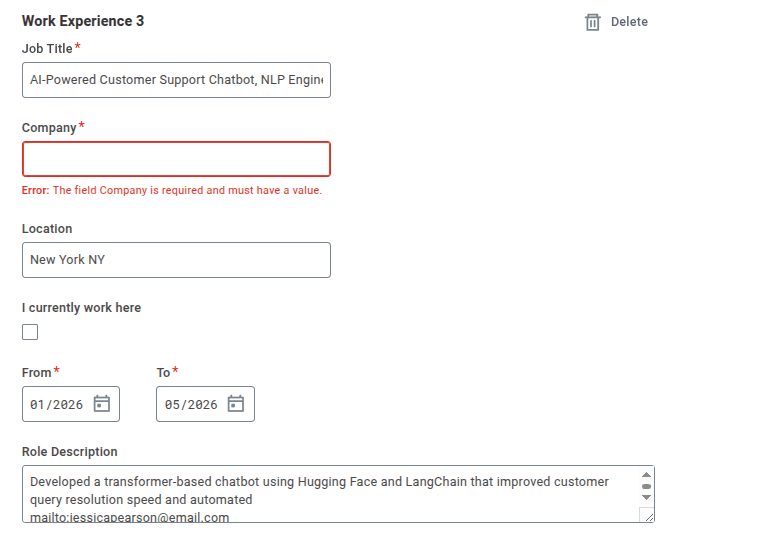
The resume listed two jobs and two projects. Workday counted all four as work experience and asked for a company on each one. Projects don’t have a company, so these fields came back empty with an error, and the form won’t let you move on until you fill them in. And if you type something in to get past it, the recruiter now sees four jobs where you have two.
Country Code Breaks Your Phone Number
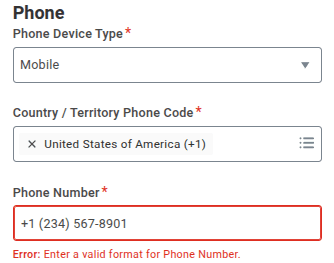
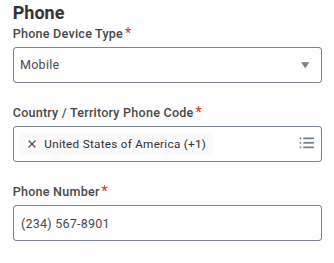
Written as +1 234 567 8901, the phone field came back blank and threw a validation error. When we wrote 2345678901, it went straight in. Workday collects the country code in its own dropdown, so the prefix breaks the field it lands in.
 |  |
Workday Guesses Your Degree
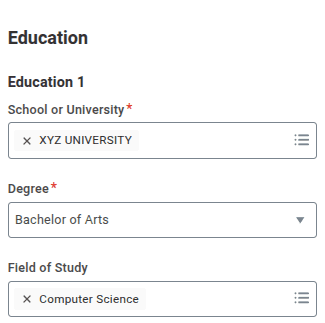
"Bachelor's in Computer Science" came back as Bachelor of Arts. The field of study was right. The degree wasn't. Nothing flags the change, so unless you scroll back and check, you apply with a degree you don't have.
Key Takeaway: Workday didn’t reject anything. It filled in a form, got three things wrong, and handed the recruiter a version of your resume that was slightly not you. The recruiter reads that form, not your resume PDF or docx, and nothing on their screen says a field was guessed.
Workday's own numbers put candidate grading at a 55% cut in screening time. Less time per candidate means less chance anyone notices a field that's wrong. candidate grading
5 Steps to Fix Your Resume for Workday
Step 1: Pull Keywords from the Job Posting
Workday matches what you wrote against its own list of standard skill names, so the words in your resume need to match the words in the posting.
Copy the posting into a plain text file
Highlight every tool, skill, and certification
Check each one appears somewhere in your resume
A job description keyword finder does the same thing faster by pulling the terms out for you.
Step 2: Keep the Layout Simple
Most advice says use one column. We tested a two-column resume, and it read fine – job titles, companies, dates, and skills all came through. So columns aren’t the problem. What matters is whether the parser can follow your resume's structure.
Put your newest job first
Write every job the same way: title, company, dates, then what you did
Leave out images, logos, and text boxes
Don’t put anything important in the header or footer
Step 3: Write Your Contacts Plainly
Write your phone number without the country code in front – Workday adds it itself, and a prefix makes the field fail. Use plain text rather than icons for phone and email, and keep your details at the top of the page instead of in a header or footer.
Step 4: Use Plain Section Headings
The Workday parser looks for headings it recognizes.
Summary
Work Experience
Education
Skills
Projects
Certifications
Awards
Publications
Volunteer Experience
Languages
Step 5: Use the Exact Words from the Job Description
Workday matches your text against a fixed list of skill names, so wording matters more than phrasing.
Write certifications both ways: “Project Management Professional (PMP)”
Match the posting’s spelling exactly, including capitalization
Use the plain tool name
Do’s and Don’ts
Do | Don’t |
Put your latest job first | Don’t group your jobs by skill instead of by date |
Use standard headings like Work Experience and Education | Don’t rename skills and tools to creative alternatives |
Use the exact keywords from the posting, written plainly: Python, SQL, Tableau | Don’t overstuff keywords or bury a tool inside a paragraph |
Put contact details as plain text at the top | Don’t put content inside images, charts, graphs, or tables |
Save as a text-based PDF or Word file | Don’t submit a scanned PDF or image-only file |
Check every field on the autofill screen before you apply | Don't use icons instead of the words phone and email |
Check Your Resume Before you Upload It
Workday doesn't tell you when something is wrong. The recruiter can't tell either — a guessed field looks the same as a real one. So the only way to catch these mistakes is to check your resume yourself, before you upload it.
ResumeUp.AI's free ATS checker runs 28 checks on your file and scores it in about 60 seconds. It flags the things that break parsers — sections that don't come through, skills that never register, contact details the parser can't read, formatting it can't follow — and each issue comes with a one-click Fix with AI option. No signup.
Frequently Asked Questions
How does Workday scan resumes?
Workday turns your file into plain text and looks for things it knows – employers, job titles, dates, degrees, skills. Each one goes into a field on the application form. Anything it can’t find stays blank. That’s why the form sometimes comes back half empty even though your resume has everything.
Does Workday read PDFs?
Yes, as long as the file contains real text. A scanned page or an image-only PDF gives the parser nothing to read. If you can highlight a line of text in your file, you’re fine. Word files work the same way.
How many keywords should I use?
Cover what the posting asks for and stop there. Workday matches your words against its own list of skill names, so plain tool names work best. Stuffing in extras doesn’t improve anything. And every skill you list is one a recruiter can ask about.
Which font should I use?
Any standard one – Arial, Calibri, Helvetica, Georgia, or Times New Roman. They all convert to plain text cleanly, so Workday reads them the same way. Keep body text at 10-12pt and skip decorative or script fonts like Comic Sans and Papyrus. More on this: 10 best resume fonts.
Can employers tell if your resume was written by AI?
Not from the file – there's no marker in a PDF, and AI detectors aren't reliable enough to act on. What recruiters do notice is generic bullets with no numbers and the same three verbs on every line. Use AI to draft, then make every line specific to your work.

Rohith Reddy
Co-Founder
Rohith Reddy is the co-founder of ResumeUp.AI and a former hiring manager who conducted 500+ technical interviews over a decade at companies including ADP. His hiring-market research at ResumeUp — including studies on ghost jobs and AI's impact on entry-level hiring — has been covered by Entrepreneur. A Computer Science graduate, he writes about what recruiters and ATS systems actually reward, from both sides of the hiring table.